Articles Index
The Science of JavaTM Sound Technology
Michael D. Meloan
Sound creates mood, triggers memories, and in conjunction with visual imagery
weaves whole worlds of fantasy. Sound is the cornerstone of multimedia content.
That's why Sun's JavaTM Media team is busy readying the Java Sound 1.0 API
for inclusion with the next release of the Java Development Kit (JDKTM).
Prior to the advent of the Java 2 platform, the language handled only telephone
quality sound, in the form of µ-law AU files recorded in mono at an 8 kHz
sampling rate. The Java 2 platform adds support for AIFF, WAV and three types
of MIDI formats. The supported MIDI formats are Type 0 MIDI, Type 1 MIDI, and
RMF.
The 1.0 API will offer a comprehensive toolkit for programmers to access the
capabilities of the underlying synthesis and rendering engine, and to expand
the applications of Java Sound. The two primary areas of emphasis are digital
audio and MIDI. Extensive low level support functions will be available so that
programmers can input and output sound, control MIDI instruments, and query
system functions.
A Sound File Primer
The major sound file types are defined as follows:
AU - (.AU or .SND) short for
AUdio—a common format for sound files on Solaris and Next machines,
and also the standard audio format for the Java platform. The three audio formats
typically used for AU files are: 8-bit µ-law (usually sampled at 8kHz), 8-bit
linear, and 16-bit linear.
WAV - (.WAV) — developed jointly by
Microsoft and IBM, support for WAV was built into Windows 95 and is carried over to
Windows 98. WAV files can store a variety of formats including µ-law,
a-law and PCM (linear) data. They can be played by nearly all Windows applications that
support sound.
AIFF - (.AIF or .IEF)
Audio Interchange File
Format is the standard audio file format for both Macintosh computers and Silicon
Graphics (SGI) machines. AIFF and AIFF-C are almost identical, except the latter
supports compression such as µ-law and IMA ADPCM.
MIDI - (.MID) Musical
Instrument Digital Interface is the
standard adopted by the music industry for controlling devices such as synthesizers
and sound cards. MIDI files do not contain digital audio samples, instead
they consist of instructions for synthesizing songs from a sequence of notes coming
from various instruments. Some MIDI files contain additional instructions
for programming a variety of synthesizer settings.
Most synthesizers support the MIDI standard, so music created on one
synthesizer can be played and manipulated on another. Computers that
have a MIDI interface can manipulate MIDI data to produce new music or
sound effects. For example, a whole musical composition can be transposed
to a new key with one software driven command.
The Java Sound engine supports two MIDI> file types:
- MIDI Type 0 files—contain only one sequence where all
instrumental parts are contained on the same logical "track."
- MIDI Type 1 files—contain multiple "tracks" so that
various instruments are logically separated for easier manipulation and
reproduction.
RMF - (.RMF) Rich Music Format is
a hybrid file type developed by Beatnik that encapsulates MIDI
and audio samples along with interactive settings. RMF acts as
a container for all music related files. Detailed documentation of copyright
information is also facilitated by RMF. An RMF file
might contain MIDI compositions and audio samples by different
artists, each with associated copyright information.
The Search for a Sound Engine
In 1997, Sun's Java Media team was looking for way to upgrade sound capabilities
while providing a solid platform for future growth. According to Java Media manager
Michael Bundschuh,
"We wanted a very high quality playback engine handling everything
from eight bit µ-law up to CD quality sound. We wanted portability
across platforms such as the SolarisTM platform, Windows, Mac and
others. We also wanted a highly developed MIDI capability across the
various platforms. Using those criteria, the logical choice was the Beatnik
Audio Engine (formerly Headspace.)"
Sun licensed the Beatnik Audio Engine as the basis of the sound engine used by the
Java Sound API.
Thomas Dolby Robertson—Beatnik
Before the early 1990s, Thomas Dolby Robertson's career was strictly musical. His 1982
hit "She Blinded Me with Science," was an early MTV blockbuster. He continued to
compose and record throughout the 80s, using a variety of off-the-shelf music generation
software. But in 1990, while collaborating on a virtual reality display for the Guggenheim
Museum, he began to think in terms of improving what was available.
"I was leaning over a C programmer's shoulder, and I suddenly realized that there was
great stuff out there for making records, but nothing for run-time interactivity."
With that idea in mind, Robertson founded Headspace in 1992, hiring moonlighting coders
to help realize his vision. Headspace incorporated in 1996, and is now known as Beatnik.
The Java Sound Audio Engine
The Java Sound engine was created for multimedia with game design and web content in
mind. Using standard MIDI files, RMF files, and/or samples from any source,
the engine will play music or sound effects with minimal CPU impact. It offers complete
playback control with the ability to mix sounds and respond in real time to user input.
The Java Sound engine is a software MIDI synthesizer, sample playback
device, and 16-bit stereo mixer. It supports mixing of up to 64 stereo MIDI
voices and audio samples. MIDI Type 0 and Type 1 files are directly supported
and wavetable synthesis from 8-bit and 16-bit instruments is provided. The engine supports
all General MIDI controllers and includes features like reverb, LFO (for
controlling sweeping filters or stereo placement), and ADSR envelopes (for shaping samples
as they are played.)
Even with all functions enabled, the Java Sound engine will stay below 30%
CPU usage on a 90 MHz Pentium computer. It can be made even more efficient by
selectively disabling unneeded features. In addition, it delivers rich content
stored in compact RMF music files. Thomas Dolby Robertson's "She Blinded
Me with Science," a 7 minute 21 second song, would take roughly 76 MB to
store as a CD quality sound file. Storing this song in RMF format reduces the
file size to approximately 636 KB, a 120:1 reduction, with impeccable playback
quality.
For more Beatnik information see, go to the
Beatnik web site.
A Brief History of Java Platform Sound
Under JDK 1.0.x and JDK 1.1.x, the AudioClip interface offered the following
functionalities.
The simplest way to retrieve and play a sound is through the play()
method of the Applet class. The play() method takes one
of two forms:
play()—with one argument, a URL object, loads and plays
the audio clip stored at the URL
play()—with two arguments, a base URL and a folder
pathname, loads and plays that audio file. The first argument most often
will be a call to getCodeBase() or getDocumentBase().
The following code snippet illustrates a direct way to play hello.au .
The AU file resides in the same folder or directory as the applet.
play(getCodeBase(), "hello.au");
The play() method retrieves and plays the sound as soon as possible
after it is called. If the sound file cannot be found, there will be no error
message, only silence.
To start and stop a sound file, or to play it as a loop, you must load it into an
AudioClip object by using the applet's getAudioClip method.
The getAudioClip method takes one or two arguments, as indicated above
for play(). The first, or only, argument is a URL argument identifying
the sound file, and the second argument is a folder path reference.
The following code line illustrates loading a sound file into a clip object:
  AudioClip co =
    getAudioClip(getCodeBase(), "horns.wav");
The getAudioClip() method can only be called from within an applet.
With the introduction of Java 2, applications can load sound files by using the
newAudioClip method of the Applet class. The previous example can be
rewritten for use in an application as follows:
AudioClip co = newAudioClip("horns.wav");
After you have created an AudioClip object, you can call the play(),
loop(), and stop() methods using the object. If the
getAudioClip or newAudioClip methods can't find the
indicated sound file, the value of the AudioClip object will be null.
Trying to play a null object results in an error, so testing for this condition
should be standard procedure.
The complete programming sample below generates an applet which will play a
flute+hrn+mrmba.au music sample when the mouse is pressed inside the
applet. The AU sample file is in the same directory or folder as the applet.
  import java.applet.*;
  import java.awt.event.*;

  public class PlayAudio extends Applet
          implements MouseListener {
          AudioClip audio;

  public void init() {
          audio = getAudioClip(getDocumentBase(),
          "flute+hrn+mrmba.au");
          addMouseListener(this);
  }

  public void mousePressed(MouseEvent evt) {
          if (audio != null) audio.play();
  }

  public void mouseEntered (MouseEvent me) {
  }

  public void mouseExited  (MouseEvent me) {
  }

  public void mouseClicked (MouseEvent me) {
  }

  public void mouseReleased(MouseEvent me) {
  }

  }
Note: The mouseDown() method included in many Java 2 technology
books is actually part of the Java 1.0 event model. Using this method will
result in warnings that the method is deprecated, meaning that it may not be
supported in the future. Use of MouseListener in conjunction with
the mousePressed method is preferred under the Java 2 platform.
API 1.0—Quantum Leap
Note: The following comments are based on the 0.86 early access version of the
Java Sound API. While most of the objects and concepts discussed here will remain
the same, it is possible that changes may occur as the API is finalized.
The Java Sound 1.0 API defines a comprehensive set of basic low-level audio
capabilities for the Java platform. It provides interfaces for:
- Audio capture and rendering
- MIDI synthesis and sequencing
These two major modules of functionality are provided in separate packages:
javax.media.sound.sampled—This package specifies
interfaces for capture, mixing, and playback of digital (sampled) audio.
javax.media.sound.MIDI—This package provides
interfaces for MIDI synthesis, sequencing, and event transport.
The 1.0 API will feature the following capabilities:
Digital Audio
- Audio capture - data capture from input sources such as microphones.
- Mixing and playback - mix and playback sound from various sources
- Controls and codecs - adjust the gain, pan, reverb, etc., and apply
format conversions
- Status and notification - receive events when playback starts and stops,
when a device opens or closes, and other related events
MIDI Support
- MIDI messaging - exchange messages (note on, note off, etc.)
- Synthesis - load instruments and generate sound from MIDI data
- Sequencing - load a MIDI sequence, start and stop playback,
and adjust tempo
Utilities
- File I/O - read and write common audio file types such as WAV,
AIFF and MIDI
- Configuration - query system for information about components
and devices; install and remove codecs, file parsers, and devices
Digital Audio
Channel
"Channel is the basic functional unit in the audio
pipeline," says Kara Kytle, lead engineer and architect for the Java
Sound API. A class that implements the Channel interface represents
an element of this "pipeline," such as a hardware device, an audio
mixer, or a single audio stream.
InputChannel and OutputChannel extend Channel
with interfaces for reading captured data or writing data for playback, respectively.
The Clip sub-interface supports looping and repositioning within its
pre-loaded audio data. Device represents any hardware or software device
for capturing, playing, or mixing audio.
This interface hierarchy is represented in the diagram below.
Package reference: javax.media.sound.sampled

Interface Inheritance Diagram
When a Channel opens, it reserves system resources for itself, and
when it closes, those resources are freed for other objects or applications. The
isOpen() method queries whether a Channel is open or
closed. Processing of data is typically initiated by subinterface methods such
as read(), which is described in the Interface InputChannel
spec (see Java Sound API Spec.)
Processing methods engage the Channel in active input or output of
audio data. A Channel in this state can be identified through the
isActive method. The Channel can be paused by invoking
pause(), and relevant Channel status can be queried using
the isPaused() method. When a Channel is paused, there
are three options: retaining the data (the default), discarding the rest of the
data in the internal buffer using flush(), or causing the rest of the
buffer to be processed immediately using drain().
An object may register to receive notifications whenever the Channel's
state changes. The object must implement the Channel.Listener interface,
which consists of the single method update(). This method will be invoked
when a Channel opens, closes, starts, and stops. A Channel
produces start and stop events when it begins or ceases
active presentation or capture of data.
InputChannel
InputChannel is a source of captured audio data. The
interface provides a method for reading the captured data from the
InputChannel buffer and for determining how much data is
currently available for reading. If an application attempts to read more
data than is available, the read method blocks until the
requested amount of data is available.
OutputChannel
OutputChannel accepts audio data for playback. This interface
provides a method for writing data to the OutputChannel buffer
for playback, and for determining how much data the channel is prepared to
receive without blocking. If an application attempts to write more data than
is available, the read method blocks until the requested amount
of data can be written.
Clip
The Clip interface represents a special channel into which audio data
may be loaded prior to playback. Because the data is pre-loaded rather than streamed,
clips support duration queries, looping, and repositioning.
Device
The Device interface provides methods for classes that represent
audio devices. An audio device is a shareable or exclusive-use system resource,
one that can be based in hardware, software, or a combination of the two. It can
be opened and closed repeatedly, often reporting its inherent latency and supporting
a set of audio formats. It also provides an info object that describes the
Device.
The Java Sound API further describes three device sub-interfaces:
InputDevice
The InputDevice interface provides a method
(getInputChannel) for obtaining an InputChannel from
which captured audio data may be read.
OutputDevice
The OutputDevice interface provides a method
(getOutputChannel) for obtaining an OutputChannel to
which audio data may be written for playback.
Mixer
A Mixer supports multiple InputChannels and/or Clips.
In addition, it supports methods for querying the total number of channels it
supports and for pausing and resuming playback of multiple channels synchronously.
Control
Channels and audio ports (such as the speaker and the microphone) commonly
support a set of controls such as gain and pan. The Java Sound API's channel
objects and port objects let you obtain a particular control object by passing
its class as the argument to a getControl() method.
Codec
Codecs encode and decode audio data, allowing translations between
different formats and encodings. The Java Sound API provides high-level interfaces
for these translations through methods in the AudioSystem class. Given
a particular audio stream, an application may query the audio system for supported
translations, and obtain a translated stream of a particular format.
Files and Streams
An audio stream is an input stream with an associated audio data format and data
length. A file stream is an input stream with an associated file type and data
length. The Java Sound API provides interfaces for translating between audio files
and audio streams in the AudioSystem class.
Querying and Accessing Installed Components
The AudioSystem class acts as the entry point to sampled
audio system resources. This class allows programmers to query and
access input devices, output devices, and installed mixers. In addition,
AudioSystem includes a number of methods for converting audio
data between different formats. It also provides methods for obtaining an
input channel or output channel directly from AudioSystem without
dealing explicitly with devices.
System Configuration - Service Provider Interface (SPI)
Configuration of the sampled audio system is handled in the
javax.media.sound.sampled.spi package. Through the
AudioConfig class methods, devices may be installed or removed
from the system, and defaults may be established. Service providers may wish
to provide and install their own codecs and file parsers. Mechanisms
for accomplishing this are provided in the package.
The diagrams below describe functional flows for audio input and output.

Typical Audio Input System

Typical Audio Output System
MIDI
Interfaces describing MIDI event transport, synthesis, and sequencing
are defined in the javax.media.sound.MIDI package. The major concepts
used in the package are described below.
Transport
The basic MIDI transport interface is MidiDevice. All devices
provide methods for listing the set of supported modes and for querying and
setting the current mode. Devices support listeners for events such as open
and close, and an info object describes the device.
Generally, devices are either transmitters or receivers of MIDI events. The
Transmitter interface provides methods for setting and querying the receiver
to which they currently direct MIDI events. Receiver supports a method for
receiving MIDI events.
The basic MidiEvent object specifies the type, data length, and status
byte associated with a message. It also provides a tick value used by devices involved
in MIDI timing, such as sequencers.
Synthesis
The Synthesizer interface is a special type of Receiver that generates sound.
It provides methods for manipulating soundbanks and instruments. In addition,
a synthesizer may support a set of global non-MIDI controls such as gain and
pan. It also provides access to a set of MIDI channels through which sound is
actually produced.
The MidiChannel interface supports methods representing the common MIDI
voice messages such as noteON, noteOff, and
controlChange. Query of the current channel state is also
supported.
Sequencing
The Sequencer interface extends MidiDevice with methods for
basic MIDI sequencing operations. A sequencer may load and play back a
sequence, query and set the tempo, and control the master and slave sync
modes. An application may also register for notification when the sequencer
processes meta and controller events.
Files and Sequences
The Sequence object represents a MIDI sequence as one or more tracks and
associated timing information. A Track object contains a list of time-stamped
MIDI events.
The Java Sound API provides high-level interfaces for converting between
MIDI files and Sequence objects in the MidiSystem class.
Querying and Accessing Installed Components
The MidiSystem class acts as the entry point to the MIDI music
system. It provides information and access relating to the set of installed
devices, including transmitters, receivers, synthesizers, and sequencers. It
also provides access to SoundBank objects.
System Configuration - Service Provider Interface (SPI)
Configuration of the MIDI system is handled in the
javax.media.sound.midi.spi package. Through the MidiConfig
class methods, devices may be installed or removed from the system, and defaults may
be established. Service providers may wish to provide and install their own file and
soundbank parsers. Mechanisms for accomplishing this are provided in this SPI package.
Now let's see what can be done with all these classes and methods. Check it out!
ToySynth Application
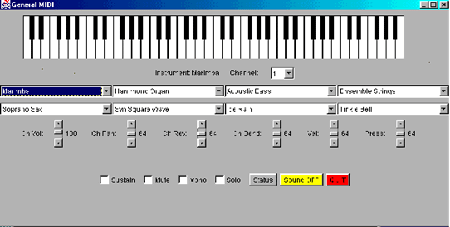
The ToySynth application exercises the Early Access Java
Sound API by offering a variety of instrument settings, MIDI channel
selection, volume control, stereo pan, reverb, and other options. Clicking
on the keyboard plays notes using the selected instrument rendered using
the Java Sound engine.
Complete ToySynth.java code example.
Download the Early Access
Java Sound API
with sample applications and code listings.
Target Markets for the Java Sound API
The Java Sound API provides audio support for a wide variety of applications.
Some of the possibilities are enumerated below.
Communication Frameworks
Content Delivery Systems
- Music
- Streamed content
- Media Players
Interactive Applications
- Games
- Web sites
- Dynamic content generation
Tools and Toolkits
- Content generation
- Utilities
Where Do We Go From Here?
Java 2 offers access to the Java Sound audio engine via the AudioClip
interface. With the release of the 1.0 API, the world of possibilities we've just
explored will be available to developers everywhere.
"Currently, we are enabling multimedia in the computer desktop market by adding
true sound support in the Java 2 platform. In the future, we would like to see
our Java Sound API technology used in professional, consumer and Internet audio
applications," says Michael Bundschuh.
Movie and record companies need professional quality audio to use the Java
Sound API technology. Implementing support for 24-bit audio and multi-channel
configurations in the Java Sound Engine will encourage the development of
professional editing and playback applications.
According to Kara Kytle, extending support for a wider variety of audio data
types such as MP3 is on the agenda. "Another agenda item is MIDI data
capture from an external device. That will come soon." she says.
"Java Sound API technology is already well suited for audio distribution over
the web," says Bundschuh. "But we're always tracking new and developing
technologies such as MP3 and secure delivery of music files. We plan to support
these technologies in future Java Sound API releases."
Recent marketplace developments, like the competing strategies for delivering
web-based musical content, have put digital sound at center stage. As new media
technologies continue to evolve, sound will play a key role. The Java Sound 1.0
API will arrive on the scene at the perfect time to participate in the development
of new killer apps.
This application brings up a graphical representation of a typical synthesizer
keyboard. Clicking on the keys with the mouse, plays the notes. You can
adjust voice settings and other options to vary the sounds produced. Have fun!
Reference URLs
Java Sound API - Spec, Early Access Download Info, Data Sheet, FAQs
http://www.java.sun.com/products/java-media/sound/
Beatnik
http://www.beatnik.com
Java Media Framework API (JMF)
http://www.java.sun.com/products/java-media/jmf/
Java 3D API
http://www.java.sun.com/products/java-media/3D/
Reference Texts
Java 2 Platform by Laura Lemay and Rogers
Cadenhead
Using Java 2 Platform by Joseph L. Weber

About the Author
Michael Meloan began his professional career writing IBM mainframe and
DEC PDP-11 assembly languages. He went on to code in PL/I, APL and C. In
addition, his fiction has appeared in WIRED,
BUZZ, Chic,
L.A. Weekly, and on National Public Radio.
Reader Feedback
Tell us what you think.