Articles Index
Is the Only Really Secure Computer a Disconnected Computer?
By Monica Pawlan
Today, computer systems everywhere run on networks, and most computer
users have a connection to the Internet. In only a few seconds or
minutes, anyone can download a program and run it locally. The
disadvantage is that a downloaded program might contain a virus or
execute code that invades your company's privacy, your privacy, or
your system's vital resources causing havoc and grief that can take
days, months, and even years to undo. It is no wonder computer
security is an important topic. People all over the world want to
enjoy the benefits of a world-wide network while keeping their
systems safe from electronic attack. The JavaTM
Development Kit (JDKTM)
1.2 meets this need with an enhanced security architecture and new
tools to provide a secure and ready-built platform for running
Java applets and applications.
A Brief History
Security policy is the set of rules and practices that control how
sensitive information is managed, protected, and distributed. New JDK
releases continue to enhance the security features and policies
inherent in the Java language and built into the Java platform. To
understand where Java security is headed, it can help to understand
where Java security has been. JDK 1.0.2 restricts applets to a
sandbox, which is the area of the web browser dedicated to that
applet. An applet can do anything inside its sandbox, but cannot read
or alter data outside its sandbox, and cannot communicate across its
sandbox. All Java applications have unrestricted access to system
resources. JDK 1. 1 introduces digitally signed Java ARchive (JAR)
files. A programmer bundles an applet and all related files in a JAR
file and digitally signs it. The person who downloads the applet
verifies the signature. If the verification succeeds, the applet
runs with full access to system resources. If the verification fails,
the applet is confined to a sandbox.
Although a digitally signed JAR file can contain a Java application,
a failure of the signature verification does not restrict the Java
application. As in JDK 1.0.2, all applications run with full and
unrestricted access to system resources regardless of whether they
pass signature verification.
JDK 1.2 empowers end users and system administrators to extend the
security policy to applications and determine how much access to
system resources an applet or Java application can have. The JDK 1.2
security policy is easy to configure, provides fine-grained access
control, and applies to all Java applets and applications.
New Security Architecture
In JDK 1.2, applets running in a browser and Java applications
invoked with special options to the java command run in a restricted
sandbox-like environment. The new architecture lets you grant Java
applets and applications permission to access certain specific system
resources outside their restricted environments.
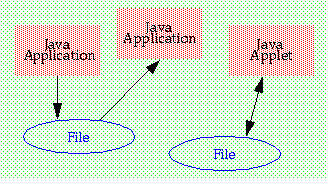 The new architecture is very flexible. You could, for example, grant
one application read access to a file and another write access to the
same file.
The new architecture is very flexible. You could, for example, grant
one application read access to a file and another write access to the
same file.
You could
also grant an applet from http://www.ze1da.com/ read and write access
to a file in c: \temp.
Because the default behavior for Java applets and applications
running in restricted environments is no access to system resources,
all access to system resources such as file systems, networking
facilities, screens, keyboards, disk drives, and printers is not
allowed unless specifically granted. The restricted environments also
prevent communications between Java programs.
New JDK 1.2 Tools
JDK 1.2 provides the following security tools to access
the new JDK 1.2 security features:
- java.security.manager
- Key Tool (replaces Java Key in JDK 1.1)
- Policy Tool
- JAR Signer
java.security.manager
Add the java.security.manager option to the java command to execute a
Java application in a restricted environment. Including the
-Djava.app.class option ensures that any application in the specified
path is subject to the security policy in force.
java -Djava.app.class.path="/home/zelda/apps"
java.security.manager anApplication
Key Tool
Key Tool is a command line script for managing the public and private
key pairs stored in the keystore file in a user's home directory. The
key pairs are for signing JAR files. Policy Tool and JAR Signer
access the key pair information stored in the keystore file with Key
Tool.
Key pairs enable a type of cryptography where the private key is kept
secret and the public key is generally available. The keys in the
pair have a mathematical relationship, so if you encrypt a JAR file
with your own private key, the recipient of the JAR file can decrypt
it with your public key. Likewise, anyone can send another person a
JAR file encrypted with the recipient's public key, which the
recipient decrypts with his or her private key.
View Key Tool options and parameters by typing
keytool and its -help option:
phoenix% keytool -help
The -genkey option and parameters add a key pair to the specified
keystore file or create a new keystore file with its first key pair.
The public key is wrapped into a self-signed certificate and stored
with the private key as a single- element certificate chain
identified by an alias. A certificate is a digitally signed statement
from one person, company, or organization saying the key of another
person, company, or organization has a particular value.
Click
here
for documents that describe Key Tool and its options in
detail.
Policy Tool
Policy Tool is a graphical user interface (GUI) available to system
administrators and end users to assign public keys and access
permissions to Java programs. It is a convenient interface to the
system-wide and individual policy configuration files. Start Policy
Tool by typing:
phoenix%policytool
Open a policy configuration file from the File menu. There is one
policy configuration file for the system and an optional file for
each user. The system configuration file is in (java.
home)/lib/security/java.policy, and the user configuration files are
located in each user's home directory.
Access permissions assigned in the user file override and add to the
permissions assigned in the system file to give specific users access
over that generally allowed to users on the system.
Whenever Policy Tool is started, it tries to fill in its window
with policy information from the user policy fila, which by default,
is named .java.policy in your home directory. If
Policy Tool cannot find the user policy file, it reports it and
displays the following blank window.

Click
here
for documents that describe Policy Tool in detail.
JAR Signer
JAR Signer is a command line script for signing and verifying JAR
files. One of its parameters is the passphrase to the keystore and
private key so it can find the key to sign or verify the JAR file.
Only people who know the passphrase can access a key to sign and
verify a JAR file.
Click
here
for documents that describe JAR Signer and its options in
detail.
Monica Pawlan
is a staff writer on the JDC team.
She has a background in 2D and 3D graphics, security, database
products, and loves to explore emerging technologies.
monica.pawlan@eng.sun.com
Reader Feedback
Tell us what you think of this article.











