
|
|
||
| You are here: About > Computing/Technology > Focus on Java |


| One of Over 700 Sites | |
 |
with Guide John Zukowski Bio | Contact |
| Subjects | |
 |
|
|
Applets Book Resources Career Resources Community Core Libraries FAQs Getting Started How-To Magazines News Sources Tools Tutorials
|
|
|
| Bookstore |
| Find books related to this topic Click Here |
| Videostore |
| Find videos related to this topic Click Here |
| ShoppingAbout |
| Your favorite products, right here Click Here |
| Stay up-to-date! Subscribe to our newsletter. |
|
Do you like our sites? Wish to share them with others - and earn money? Become an Affiliate |
| More Sites on this Topic |
|
Java Coffee Break |
|
||||
|

Iteration Statements - Part 1: The for Statement
The next three features will be a series on using iteration statements in the Java programming language. Part 1 will describe the ever popular for loop. Then in part 2, we will describe the frequently used while loop. Finally, in part 3 you'll find the less frequently used do-while loop described. In theory, all three looping constructs can be used to create the same program (with a strategically placed if-statement). However, each tends to serve a more unique purpose. On now to the for statement.
The for Statement
Chapter 14 of the Java Language Specification describes the general structure of the for statement. The syntax is as follows:
  for (initialization block;
       loop condition;
       update block)
    loop body
Basically, the for statement works like this. The initialization block is executed to initialize any variables necessary to control the looping. Before executing the loop body, the loop condition is checked. If the loop condition is true, the loop body is executed. After executing the loop body, the update block is executed. The loop condition is checked again, before repeating back into the loop body, if appropriate. The following flow chart demonstrates this construct:
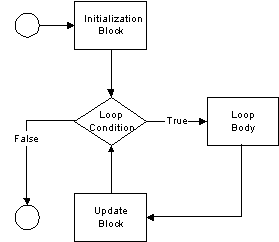
In short, a basic for statement would look like the following:
for (int i=0; i < 10; i++) {
  System.out.println(arrayVariable[i]);
}
Let's look at the different parts in more detail now.
Initialization Block
The initialization block allows you to declare and initialize variables to be used for controlling the loop flow. Any variable declared in the initialization block is only visible from within the for statement. So, if you need to access it after the for statement, don't declare it in the initialization block. If multiple variables need to be declared, separate them by a comma, as in int i=0, n=arrayVariable.length. If the ending loop condition needs to be looked up for each pass through the for loop, and is constant, it is faster to look it up once and save the value here.
Loop Condition
The loop condition is a boolean expression used to test if the looping should end. When the loop condition is left out, the condition is always true. If the loop condition is not a boolean expression, then a compile-time error will result.
Loop Body
The loop body is a single statement executed each time the loop condition is evaluated to be true. If multiple statements need to be executed, then the statements must be placed within curly braces ({statement; statement; }). It is best to always use the braces so you don't accidentally assume multiple statements are executed because of inappropriate indentation levels within your source.
Update Block
The update block is executed after each iteration through the loop body. This tends to modify the variables initialized in the initialization block so that an ending loop condition is reached. Like the initialization block, multiple expressions can be present in a legal comma-separated list.
Transfer Statements
That's almost it for the for statement. One final note is the use of the break and continue statements within a for statement. If the break statement is encountered within the for statement, control is transferred to the next statement after the for loop. On the other hand, if the continue statement is encountered, control immediately goes to the update block.
Other Tidbits
I'll be back next week with more things to do and places to go. If you have any comments about this week's feature, be sure to post them to the bulletin board. If you have any questions or topic suggestions, let me know or submit feedback. For technical questions, try to post them to the bulletin board area, instead of emailing me directly. That way, everyone can benefit from an answer, as well as offer answers. See you next time.
| Subscribe to The Focus on Java Newsletter | ||
|
Email |
| |
| Sponsored Links | ||||||||
|
| Advertising | |||||||||
|
| Related sites | |
|
|
| on About | |
|
|
|