. |  Compact
Macs
128K | 512K
512Ke | Plus
SE | SE/30
Classic
Classic II
Performa 200
Color Classic
Color Classic II
Related Pages
Compact
Macs List
Older Mac
System Software
Software for
68000-based Macs
Best Classic Mac Sites
Color Classic FAQ
The Macquarium
System Profiles
Lisa/Macintosh
XL
Mac II
Mac LC
PowerBook
(68k)
Performa
500
Series
Centris &
Quadra
Power
Macintosh
PowerBook
(PPC)
iMac
Maclone Profiles
Earliest
Maclones
Motorola
StarMax
Power
Computing
Umax
SuperMac
Email
Lists
Vintage
Macs
Quadlist
(68040)
PowerBooks
Power
Macs
SuperMacs
Mac
Webmasters
Mac
Managers
Other Low End Mac Pages
Linux
Links
Mac
Daniel
Mac
Musings
Real Deals
Low End Mac Help
Desk
Best Buys, Used
Macs
Software
Downloads
Road
Apples
Filtering
Spam
Macspeak
Memory Upgrade
Guide
Apple
Timeline
Top
Pages
Support Low End Mac
Outpost.com
AuctionMac
Amazon.com
MusicForce 
| . | Macintosh SEcode name: Plus Plus, Maui, Aladdin,
Chablis, FreeportGot a compact Mac? Consider joining the Compact
Macs email list. 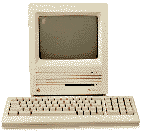 Overview Overview
Introduced along with the Mac
II in March 1987, the SE came with 1 MB of RAM, one or
two double-sided 800 KB floppies, and space to mount an
internal SCSI hard drive (second bay held either a hard
drive or second floppy -- no room for both, although that
didn't stop some people from creating a bracket to mount a
hard drive in a two-floppy SE). The SE was the first compact
Mac with a built-in fan. Note that the SE is sometimes referred to as the SE 1/40,
4/80, etc. These are not different models, nor should they
be confused with the more powerful SE/30.
These numbers refer to the amount of memory and size of the
internal hard drive, respectively, so an SE 4/40 would have
4 MB of RAM and a 40 MB hard drive. In August 1989 Apple began to ship the SE with their high
density floppy drive, known as the FDHD (floppy drive, high
density) or SuperDrive (for its ability to read and write
IBM-format floppies with additional software). Not only did
this provide 1.4 MB capacity, but the ability to work with
3.5" DOS disks using special software. The SE was introduced as the low-end cousin of the hot
new 16 MHz Mac II. The SE was
the first compact Mac with an expansion slot. One of the
first add-in cards was an MS-DOS card. Over time, color
video and accelerator cards became popular accessories. You can convert a non-working compact Mac into a
Macquarium. (Please, don't
even think of converting a working one -- you can always
find someone interested on the Classic
Macs or Vintage
Macs lists.) Details- SE introduced 2 March 1987 at $2,900 (dual floppy) or
$3,700 (with 20 MB hard drive); discontinued 1 August
1989
- SE FDHD (1.4 MB floppy) introduced August 1989;
discontinued October 1990
- requires System 4.1 to 7.5.5
- CPU: 8 MHz 68000
- performance: 1.0 (relative to SE); 0.37, MacBench 2.0
CPU; 0.98, Speedometer 3; 0.7 MIPS
see Benchmarks: SE
for more details - ROM: 256 KB
- RAM: 1 MB, expandable 4 MB using pairs of 256 KB or 1
MB 150ns 30-pin SIMMs (will not work with two-chip 1 MB
SIMMs)
- configurations included dual-floppy or one floppy
plus 20, 40 or 80 MB hard drive
- 9" b&w screen, 512x342 pixels
- ADB ports for keyboard and mouse
- DIN-8 serial ports on back of computer
- DB-25 SCSI connector on back of computer, maximum
throughput of 5,248 kbps
- floppy: 800 KB or 1.4 MB double sided
- floppy connector on back of computer
- size (HxWxD): 13.6" x 9.6" x 10.9"
- weight: 17 lb.
- Gestalt ID: 5
- addressing: 24-bit only
- single SE PDS slot
- upgrade path: SE/30
motherboard
Accelerators & UpgradesSome accelerators have onboard SIMM slots, allowing them
to use more than 4 MB of RAM. - Macintosh SE/30 motherboard (16 MHz 68030)
I've seen used SE/30 motherboards for under $100. - MicroMac Multispeed
(16, 25, or 32 MHz 68030), optional 32 MHz 68882 FPU
- MicroMac Performer
(16 MHz 68030), optional 25 MHz 68882 FPU
- MicroMac Performer
Pro (32 MHz 68030), 64 KB cache, optional 68882 FPU,
available
from Outpost.com
 - Sonnet Technologies Allegro
SE (33 MHz 68030), 33 MHz 68882 FPU
- 603
upgrade for SE, Classic, and Color Classic
(Japanese)
Discontinued accelerators (68030 unless otherwise noted)
include the Applied Engineering TransWarp (16, 40 MHz), Dove
Marathon Racer (16 MHz), Extreme Systems Vandal (50 MHz),
Harris Performer2 (16 MHz 68000), MacProducts Railgun (33
MHz), Mobius (25 MHz), NewLife Accelerator! (16, 25, 33
MHz), Novy ImagePro (16, 25, 33 MHz), and Total Systems
Mercury (16 MHz), Gemini Integra (50 MHz), and Gemini Ultra
(33, 50 MHz). Color? Aura Systems made ScuzzyGraph II, a SCSI
peripheral that provided 8-color video for people who didn't
want to buy (or couldn't afford) a Mac II. 1989 cost was
$995-2,495, depending on resolution. Tips- If you have less than 4 MB installed, upgrade to 4
MB. You can often find pulled 1 MB SIMMs (removed from
other Macs during upgrade) inexpensively.
- The SE cannot use two-chip 1 MB SIMMs.
- Memory permitting, set the disk cache to 128k.
- To use HD floppies on a pre-SuperDrive SE, look into
the Applied Engineering AE HD+ external floppy drive.
They are available from Que
Computers for $99 (612-623-0903). Note that the
"plus" is important -- the AE HD will not do the
job.
- Because of limited SCSI throughput, hard drives for
the SE should usually be formatted with a 2:1 interleave.
This is particularly true of older drives.
(Unfortunately, other Macs may find it difficult or
impossible to work with this interleave.)
- If you need to create the smallest possible System
file, you can delete Chicago 12, Geneva 9 and 12, and
Monaco 9, since these fonts are in the SE ROMs.
- To remove the hard drive: find the two screws holding
the drive bracket in place. They will be facing the rear
of the computer and underneath the drive itself. You'll
need a fairly long Phillips screwdriver to reach them --
and you'll need to disconnect the power and data cables
before you can get to them. Once the screws are loose,
lift the back and it should come out easily.
Online Resources- System
6 for the Macintosh, Ruud Dingemans. If you have an
older, slower, memory-limited Mac, System 6 is fast,
stable, and still very usable.
- Cruising
the web in black & white, John C. Foster,
MacWEEK, 10/20/1999
- 30-pin
SIMM memory pricing, RAMseeker
- Applied Engineering AE HD+
FAQ, Adam Takessian. The ins and outs of Applied
Engineering's 1.4 MB floppy for the 512Ke, Plus, and 800
KB SE.
- Mac Museum: Mac
SE, SE/30, Mac Users Militia
- Upgrades: Macintosh
SE, MacSpeedZone
- Teaching an
old Mac new tricks, MacTeens
"Today we'll take a look at just the effort it takes to
bring a Macintosh SE back from negligence and into a
great world of productivity once again." - Transparent SE, a very
rare edition
- Faster browsing on
older Macs, Mac Online Technical Journal
- Old
Macs on the internet, The Web Toolbox
- SE
fever: the lure and reward of vintage computing,
Steve Wood
- SE
saga, Steve Wood
- Email lists: Classic
Macs Digest, Compact
Macs
- Macintosh
SE support page, top notch, great links
- Memory upgrade
guide
- Links to System 6.0.8 and
7.0.1
- Internet
Classic Mac Users Home Page
- Review of MicroMac
Performer accelerator.
- Obsolete
Computer Museum
- Software Compatible with
68000 CPU
- Apple
Specs Online for SE
- Mac
Antiques (512Ke, Plus, SE)
- Get your compact Mac on the web with tips from
JAG's
House.
Cautions- That monitor packs a lot of voltage. Read Compact
Mac CRT Energy before working inside.
- Macs with black-and-white only displays (1-bit, no
grays) may find Netscape Navigator 3 makes it impossible
to view some pages and sites. The workaround is to use
Navigator 2.
- Some early SEs had noisy fans; MacUser (11/92)
recommends replacing them.
- Reliably supports serial
speeds to 19.2 kbps, although default is 9600 bps.
May have better throughput at 28.8 kbps despite some
dropped and retransmitted packets. Use of a high speed
modem may be limited. See 56k
modem page. For more information on Mac serial ports,
read Macintosh Serial
Throughput on the Macintosh
Online Technical Journal.
- Apple discontinued support and parts orders for this
model on 31 August 1998. You may be able to find dealers
with parts inventory either locally or on our parts
and service list.
<back to compact
Mac index or Low
End Mac home
page>
| . |