 |
Help
 SEARCH SEARCH
 Introduction Introduction
What's New
Main Search
Advanced Search
Images, Audio, Video
Search
Results Pages
Categories
Discussions
News Search
FAQ
Entering Accents
Language Settings
Add/Remove a URL
Report Offensive Page
Family Filter
Babel Fish
Download IE 5
Download AltaVista Power
Tools
Glossary
 EMAIL EMAIL
LIVE!
LOCAL
SHOPPING
FREE ACCESS
CONTACT US
|
IMAGE, AUDIO, VIDEO SEARCH
|
|
|
|
| |
Introduction |
| |
In addition to containing a wealth of textual information, the World Wide Web is a rich source of image files, audio clips and short video segments.
AltaVista can help you find these types of multimedia files on the Web using its Images, Audio & Video Search.
|
|
|
|
| |
A Look at the Search Box
|
| |

Begin your search of images, audio & video files at the AltaVista home page--the same place you begin a Web search. To search for multimedia files, however, click the tab labeled
Images, Audio & Video above the AltaVista query box. The above search box is displayed for you to begin your search.
For help using any of the standard search features, please see the Main Search page.
|
|
|
|
| |
Advanced Options
|
Back to Top  |
| |
Click here to change any of the settings below:
General Options
A Web page can contain multiple images, video and audio clips that match your search. AltaVista gives you the option of including just one sample match on the results page.
- Limit to one result per URL
Image Options
You can choose to display only photographic images (those taken with a traditional or digital camera); any type of graphical drawing, logo, or computer-generated artwork;
or both by specifying your preference in the Image Choices category.
Image Choices
You can choose to display images that are only in color, only in black and white, or in both color and black & white by specifying your preference in the Color Options category.
Color Options
You can choose to exclude small buttons, wide banners and tall thin pictures from your search by checking the corresponding box under Shape Choices.
Shape Choices
- Exclude buttons and banners
|
|
|
|
| |
How to Use Image, Audio & Video Search
|
Back to Top |
| |
- Type the keyword(s) of what you are looking for in the search box.
- Use the buttons below the search box to indicate whether you want to search images, audio or video. The default is images.
- From the drop-down menu, select 'Web & Collections,' 'Web only,' or 'Collections only.' *
- Click the Search button to begin your search.
*The Web area contains images, videos and audio clips from the AltaVista Web index. The collections are catalogs of images,
videos and audio content from sources such as the Corbis Collection, Getty Images and CDnow.
|
|
|
|
| |
Special Commands for Image, Video and Audio Searches
|
Back to Top |
| |
In additional to the commands which can be used in AltaVista's Main Search, the ones below can be used in
the Image, Audio & Video Search to find specific information. Type them in the AltaVista query entry box shown above.
| Keyword |
Function |
|---|
| domain:domainname
| Finds pages within the specified domain. Use domain:uk to find pages from the United Kingdom, or use domain:com to find pages from commercial sites.
| | host:name
| Finds pages on a specific computer. The search host:www.shopping.com would find pages on the Shopping.com computer, and host:dilbert.unitedmedia.com would find pages on the computer called dilbert at unitedmedia.com.
| | media:text
| Finds files containing the specified text. Use media:beaches to find pages with images, audios or videos named beaches.
| | title:text
| Finds pages that contain the specified word or phrase in the page title (which appears in the title bar of most browsers). The search title:sunset would find pages with sunset in the title.
| | url:text
| Finds pages with a specific word or phrase in the URL. Use url:Corbis to find all pages that have the word Corbis in the host name, path or file name -- the complete URL, in other words.
|
|
|
|
|
| |
Image Results
|
Back to Top |
| |

The image search results page contains the following elements:
- File name
- Thumbnails of the images found
(Clicking on the thumbnail takes you to the Web page containing the image.)
- Width and height (in pixels)
- File size (in KB)
- Link to more information about that image
- Link to images that are similar
Clicking 'Detailed view' at the top of the page displays the result page in an expanded view. This expanded view includes the page title, page URL, file name, file type, dimensions, file size and nearby text.
More info and similar links are also present.
More info - Links to more information about the image, including the file format, file size, width and height, transparency, color class (color or black & white)
and medium (photo or graphic). Also shows the page title, page URL, the file name and any text appearing near the image on the Web page.
Clicking the URL opens that Web address in your browser window. Clicking the  icon opens the URL in a new browser window.
You can also click the 'More images, audios, and videos from this page' link to see a summary of other image, audio or video files located on the same Web page as your searched item.
Similar - This link, when present, generates a result page containing images which are visually similar to the selected image. Similarity is based on visual
characteristics such as dominant colors, shapes and textures.
|
|
|
|
| |
Video Results
|
Back to Top |
| |

Similiar to the image search results page, each video clip is represented by a still-shot appearing as an image. The result page also includes the file name, a thumbnail of the first frame of the video, running time, file size, and a link to more information about that video.
Clicking 'Detailed view' at the top of the page displays the result page in an expanded view. This expanded view includes the page title, file type (i.e. mov, ram, avi), duration and file size, page URL,
file name, nearby text, and copyright. Also a link to More info.
More info - Links to more information about the video, including the file format, file size, width and height, duration, frame depth, frame rate, clip title, author and copyright.
Also shows the page title, page URL, the file name and any text appearing near the image on the Web page.
Clicking the URL opens that Web address in your browser window. Clicking the
icon opens the URL in a new browser window.
You can also click the 'More images, audios, and videos from this page' link to see a summary of other image, audio or video files located on the same Web page as your searched item.
|
|
|
|
| |
Audio Results
|
Back to Top |
| |
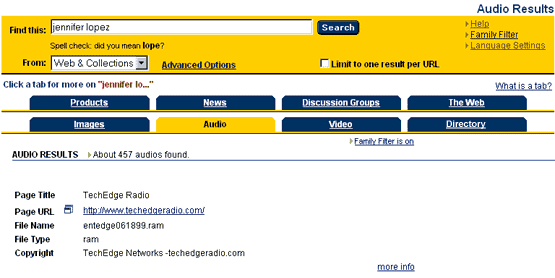
The audio search result page displays the page title, page URL, and file name of the audio clip found. It also includes the file type, and copyright information. Each entry also includes a link to more information.
Clicking the URL opens that Web address in your browser window. Clicking the
icon opens the URL in a new browser window.
More info - Links to more information about the audio, including the file format, file size, duration, channels, sample bits and sample rate, clip title, author and copyright. Also shows the page title, page URL, the full file name and any text appearing near the audio on the Web page.
You can also click the 'More images, audios, and videos from this page' link to see a summary of other image, audio or video files located on the same Web page as your searched item.
|
|
|
